
AI setup via MCP Early access
Set up your hotel with your own AI.
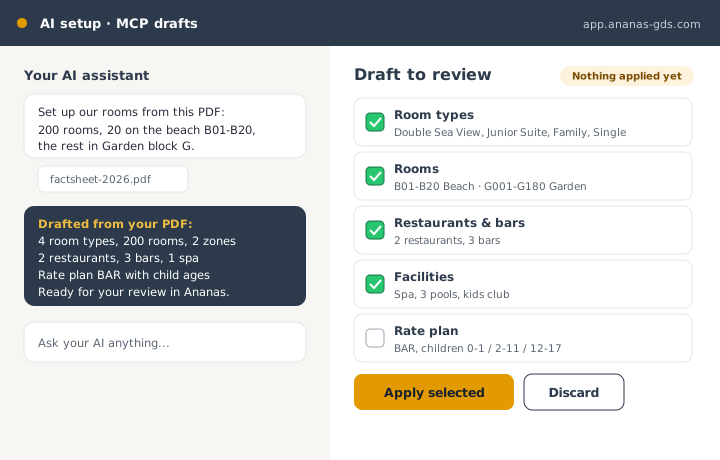
Connect Claude or ChatGPT to Ananas. Hand it your fact sheet PDF or rate sheet; it drafts your property, rooms and facts, Ananas checks every field, and you apply with one click.
Early access
From a PDF to a hotel in minutes
Connect your assistant to Ananas once. Then give it what you already have — a fact sheet, a rate sheet, a spreadsheet — and ask it to set up your hotel.
- Drafts your property, rooms, facilities and policies
- Ananas checks every field before it is saved as a draft
- You review and apply in the app
How it works
Three steps. You stay in charge.
1
Connect your AI
Add the Ananas MCP connection to Claude or ChatGPT with your own account.
2
Hand it your documents
Upload your fact sheet PDF or rate sheet and ask it to set up your hotel.
3
Review and apply
Open the drafts in Ananas, check them and apply with one click.
Frequently asked questions
Any assistant that supports the Model Context Protocol (MCP), such as Claude, and ChatGPT with connectors. You use your own AI account.
No. The AI only creates drafts. A person reviews each draft in Ananas and applies it. Unknown or invalid fields are refused outright.
On purpose. Rooms, facts and policies are low-risk to draft; prices reach your channels, so they are set with the most care and last.
No. Ananas runs no AI of its own on your data. Your assistant reads and drafts through the connection you set up, under your AI provider’s terms.
Keep exploring
Let your AI do the typing.
Create a free account, tell us you are a hotel and we switch on the early-access modules for you. No credit card. No integration needed to start.
Prefer to talk first? Contact us